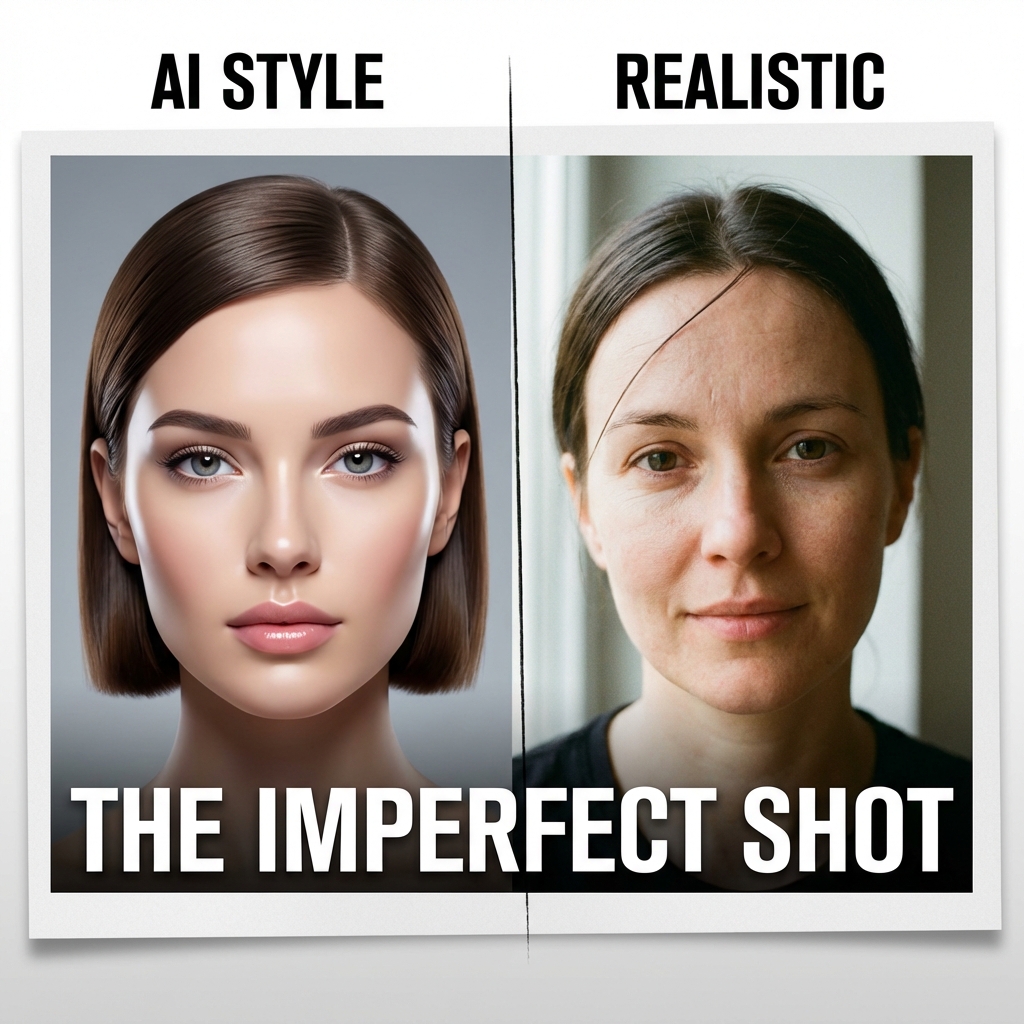
Reality is messy. If your image is clean, it's fake.
We've all seen it: the "AI glaze." Skin that looks like polished vinyl. Lighting that wraps perfectly around every strand of hair. A background that is somehow both hyper-sharp and physically wrong. If you want believable images, stop asking for "perfect." Start asking for evidence. The short version is this. Photorealism comes from physical clues, not beauty adjectives. Camera context tokens like phone camera, flash, high ISO, and motion blur consistently outperform vague "quality" tokens when realism is the goal. I build realism in passes: composition first, then lighting, then skin and material texture, then artifacts. And I keep one truth anchor in every frame, usually lens behavior, exposure imperfection, or environment continuity. Newer models in 2026 follow instructions better, but they still drift on identity and layout precision when prompts are unconstrained.
What Changed In 2026 (And What Did Not)
The tooling got better. The failure modes did not disappear. Modern image systems now follow directions better, especially with edits and iterative turns, but they can still miss on exact text, character persistence, and rigid composition across generations. That means you cannot brute-force realism with one giant prompt and hope for consistency. The practical shift is this: treat generation like photography direction, not keyword dumping.
The "Anti-Prompting" Strategy
Most users prompt for quality words: 4k, 8k, masterpiece, award winning. The problem is that "award winning" photography is often heavily retouched. So the model gives you retouching, not reality. To get reality, you need to prompt for source material.
1. The Phone Camera Aesthetic
Nothing screams "real" like a bad camera. Modern phone cameras have specific noise patterns and lens distortions that our brains associate with "truth."
- Keywords:
shot on iPhone 8,low quality phone photo,candid snap,motion blur,digital noise,red eye
2. Direct Flash
Studio lighting is perfect. Flash lighting is brutal. It flattens features, creates harsh shadows, and often over-exposes the forehead. But it looks incredibly real.
- Keywords:
direct flash,harsh flash,nightclub photography,disposable camera,vignette
3. Skin Texture (The "Pores" Problem)
AI models love smooth skin. You have to fight them to get texture. You need to explicitly ask for the things we usually pay retouchers to remove.
- Keywords:
visible pores,skin texture,acne scars,wrinkles,unretouched,raw photo,subsurface scattering
4. Optical Imperfections (The Missing Layer)
Most "fake-looking" images fail at optics before they fail at anatomy.
Add small camera failures: - edge softness instead of perfect sharpness wall-to-wall - mild chromatic aberration in highlights - practical noise in shadows - imperfect white balance when mixed lighting is present These cues are tiny, but they are exactly what humans use subconsciously to decide if something feels captured or fabricated.
A Practical Realism Workflow
Pass 1: Lock The Shot
Choose one lens intention and one camera position. Do not mix "85mm portrait compression" with "extreme wide action perspective" in the same sentence.
Pass 2: Lock The Lighting Story
Pick one dominant light condition:
- hard noon sun
- overhead fluorescent office light
- on-camera flash at night
Then add only one secondary light source if needed.
Pass 3: Add Surface Truth
Now layer skin, fabric, and environment texture cues:
- skin pores + micro-contrast
- fiber detail on cloth
- fingerprints, dust, smudges, or humidity on glass/metal
Pass 4: Add Capture Artifacts
Use one or two imperfections only. Too many and it turns into an effects demo.
Pass 5: Reject The Pretty Failure
If it is beautiful but physically implausible, reject it. Realism beats polish.
Gallery of Imperfection
Here are three examples of images that embrace flaws to achieve higher realism. None of these look like "Digital Art." They look like photos.
[Image gallery: 3 related images are displayed with captions.]
Prompt Hygiene: Add Fewer Contradictions
Many realism prompts fail because they contain conflicting instructions: - "raw candid phone photo" plus "ultra detailed cinematic studio masterpiece" - "harsh direct flash" plus "soft golden-hour diffusion" - "motion blur action" plus "tack sharp micro detail everywhere" Use one capture story per frame. If you want alternate looks, generate multiple variants with clean, separate prompt intents instead of combining everything into a single overloaded line.
Model-Aware Execution (February 2026)
No model gives realism by default, but each tool has strengths you can exploit:
- OpenAI GPT Image workflows: strong instruction following, iterative edits, and high input-fidelity modes are useful when you need to preserve key details while changing capture conditions.
- Midjourney style controls: style references plus adjustable style weight can keep a realism look coherent across a batch without rewriting the entire prompt every time.
- Diffusion + structural control: ControlNet depth/edge/pose conditioning helps keep geometry believable, especially when candid realism also requires stable composition.
The practical takeaway: choose your "realism stack" based on what is currently breaking - identity, geometry, or texture.
Plain-English Glossary
If you are newer to these tools, here are the terms in simple language:
- Prompt token: a word or phrase in your prompt that nudges style or behavior.
- Iterative edit: generate an image, then refine it in small steps instead of restarting from zero.
- Structural control: giving the model extra shape guidance (depth map, edges, or pose) so composition stays stable.
- Input fidelity: how closely the generated output preserves key traits from a reference image.
- Photorealism: an image that looks captured by a real camera under plausible physical conditions.
A 10-Second Quality Gate
Before shipping an image, ask:
- Would this lighting setup exist in a real scene?
- Does skin look like skin under this lighting, not plastic?
- Is depth-of-field behavior consistent with the implied lens?
- Are there tiny capture flaws that make this look observed, not designed?
- If this is part of a sequence, does environment geometry remain stable?
If you cannot say "yes" to at least four, iterate.
Iteration Loop That Actually Works
When realism fails, debug in this exact order:
- Geometry check: Is perspective and lens behavior physically plausible?
- Lighting check: Does the light source explain every major highlight and shadow?
- Material check: Do skin, hair, cloth, and surfaces react to light correctly?
- Capture check: Are there believable artifacts from the implied camera context?
Most people reverse this and tweak texture first. That usually wastes time.
Starter Workflow For Beginners
If this is your first time trying for realism, run this quick 20-minute practice:
- Generate one portrait with a simple prompt and no style words.
- Regenerate it with one capture context (
direct flashorphone camera photo). - Add one texture cue (
visible poresorunretouched skin texture). - Add one artifact (
mild motion blurordigital noise). - Compare all versions side by side and keep only the most physically believable one.
This exercise trains your eye to prioritize plausibility over polish.
The Uncanny Valley of Perfection
The closer you get to visual perfection, the faker it feels. The uncanny valley is not only about faces; it is about lighting physics, lens behavior, and texture plausibility. By adding grain, blur, and "bad" lighting intentionally, you bridge that gap. The viewer's brain thinks: "No one polishing for likes would choose this flaw, so it might be real." That is the paradox of photorealism in 2026: realism is not about adding detail forever. It is about adding the right kind of evidence.