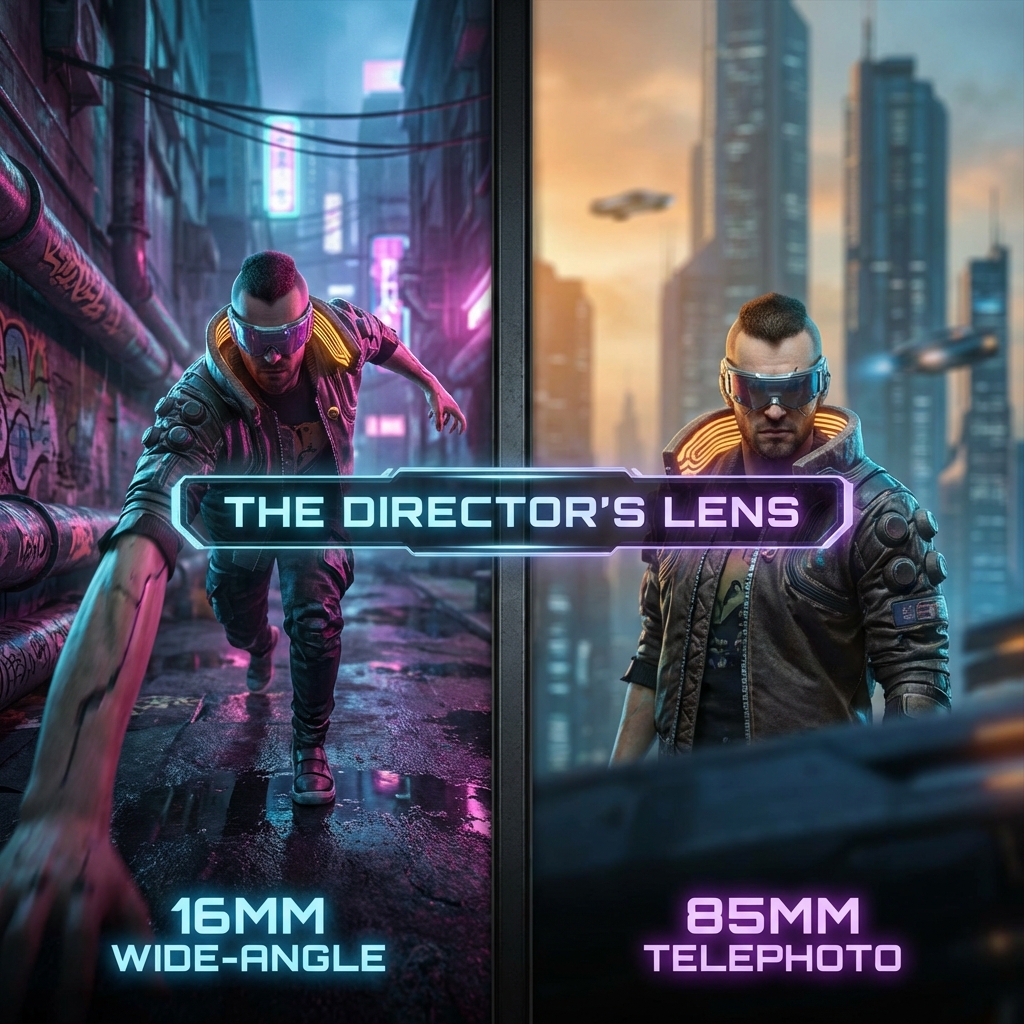
You don't take a photograph, you make it. - Ansel Adams
Most people start AI image generation by obsessing over subject: "a cyborg warrior," "a cute cat," "a futuristic city." They describe the what and ignore the how. That works for a while, right up until every image starts feeling like the same expensive stock photo. The difference between generic output and cinematic output is almost always camera direction. As creators, we are doing three jobs at once: production designer, DP, and editor. Subject matters, but camera decisions decide tension, hierarchy, and emotional weight.
The practical rule I keep coming back to is simple. Prompt the shot, not just the subject. Pick lens behavior on purpose. Pick angle on purpose. Add one composition rule and resist the urge to stack five. And use a stable sequence that keeps prompts readable: shot size, lens, angle, motion, then lighting. Even with better instruction-following in 2026, explicit camera direction still beats vague style language every time.
Why Camera Direction Still Matters In 2026
Current models follow instructions better than they did a year ago, but they still fall back to "safe portrait defaults" when prompts are underspecified. That means if you want intentional storytelling, you must specify camera language directly. When you do this consistently, three things improve fast: - scene readability - emotional control - visual continuity across a sequence If you are using Midjourney, OpenAI GPT Image, or diffusion pipelines in Diffusers, this same principle holds: the more explicit your camera intent, the less random your framing becomes.
The Power of Focal Length
In photography, focal length controls field of view and perspective compression. Models trained on photographic corpora map these cues surprisingly well when your prompt is explicit.
15mm - 24mm: The Wide Angle
Wide-angle lenses exaggerate perspective. Objects close to the camera look huge; the background stretches out into infinity.
- Use for: Action shots, vast landscapes, making a character feel dynamic or overwhelming.
- Prompt Keywords:
16mm lens,ultra-wide angle,fisheye lens,GoPro footage,dynamic perspective
35mm - 50mm: The Human Eye
This range represents roughly what the human eye sees. It feels natural, documentary-style, and unpretentious.
- Use for: Street photography, environmental portraits, scenes where you want "realism."
- Prompt Keywords:
35mm lens,50mm lens,standard lens,street photography
85mm - 200mm: The Telephoto
Telephoto lenses "compress" space. They make the background look closer to the subject and are famous for that creamy, blurry background (bokeh). They flatter faces and isolate the subject.
- Use for: Portraits, emotional close-ups, isolating a character from a busy crowd.
- Prompt Keywords:
85mm lens,telephoto lens,bokeh,shallow depth of field,background compression
Add Shot Size Before Lens
Many prompts fail because they define lens and forget framing intent. Use this order:
- Shot size: extreme wide, wide, medium, close-up
- Lens: 16mm, 35mm, 50mm, 85mm
- Angle: low, high, dutch, eye-level
- Motion cue: handheld, dolly-in, static tripod, slight camera shake
- Lighting context: overcast daylight, practical tungsten, direct flash
That sequence drastically reduces ambiguous compositions.
Controlling Camera Angles
Where you place the camera dictates the power dynamic of the scene.
The Low Angle (Worm's Eye View)
When the camera looks up at a subject, they appear powerful, dominant, or terrifying. The subject towers over the viewer.
Prompting: low angle shot, worm's eye view, looking up at character, imposing perspective
The High Angle (Bird's Eye View)
When the camera looks down on a subject, they appear vulnerable, small, or isolated. It emphasizes the environment around them.
Prompting: high angle shot, bird's eye view, looking down from rooftop, drone shot, satellite view
The Dutch Angle
Also known as a "canted angle," this is when you tilt the horizon line. It creates a sense of unease, chaos, speed, or disorientation. It screams "something is wrong" or "intense action."
Prompting: Dutch angle, canted angle, tilted horizon, dynamic tilt, disorienting angle
Plain-English Camera Glossary
If camera jargon feels intimidating, use this quick translation:
- Focal length: how "zoomed in" your lens feels.
- Field of view: how much of the scene fits in frame.
- Compression: telephoto effect where background feels closer to subject.
- Depth of field: how much of the frame appears in focus.
- Shot size: how close the camera is (wide, medium, close-up).
- Blocking: where subjects are positioned and how they move in the scene.
You do not need all terms at once. Pick two per prompt and grow from there.
Composition Rules That Actually Transfer
You do not need a film school checklist. You need three reliable constraints:
- Foreground-midground-background layering: gives instant depth.
- Leading lines: streets, railings, hallways, shadows that direct attention.
- Negative space with intent: leave room in the frame where motion or tension can "land."
Avoid stacking too many style directives. One composition rule, one lens choice, one emotional intention is enough.
Gallery of Camera Techniques
Here is how these distinct camera choices fundamentally alter the feeling of a scene, even with similar cyberpunk subject matter.
[Image gallery: 3 related images are displayed with captions.]
Prompt Pattern: Director-Friendly And Reusable
Use this reusable pattern:
[shot size], [angle], [lens], [subject action], [environment], [lighting], [one texture cue], [one motion cue] Example: wide shot, low angle, 24mm lens, courier sprinting through rain-soaked alley, neon signage, direct flash mixed with practical storefront light, wet asphalt reflections, slight handheld jitter This structure is simple enough for daily use and specific enough to prevent collapse into portrait defaults.
Three Practice Drills (30 Minutes Total)
Use these drills to build camera intuition quickly:
Drill 1: Same Subject, Three Lenses
Prompt the same subject and scene with 24mm, 50mm, and 85mm. Goal: feel how perspective and emotional distance change.
Drill 2: Same Lens, Three Angles
Keep 35mm constant and generate low-angle, eye-level, and high-angle versions. Goal: observe power dynamics created by camera height alone.
Drill 3: Same Shot, One Composition Rule
Create three versions of one shot:
- version A with leading lines
- version B with strong foreground framing
- version C with negative space
Goal: understand how composition changes story emphasis without changing subject.
Quick Troubleshooting Guide
If results still feel random, run this checklist:
- Too close by default? Add explicit shot size (
wide shot,full body,environmental portrait). - Lens feels ignored? Remove competing style tags and keep only one lens token.
- Action feels flat? Add camera height and angle plus one directional motion cue.
- Mood is wrong? Replace abstract mood words with concrete lighting language.
Most failures come from ambiguity, not model intelligence limits.
Putting It Together: The "Director's Prompt"
Don't just prompt a subject. Prompt a shot. Weak Prompt: > A cool samurai fighting a robot in the rain. Director's Prompt: > Low angle wide shot, 16mm lens, dynamic perspective looking up at a samurai clashing with a massive robot. Rain splattering on the lens, dark stormy sky background, high contrast lighting.
By specifying the angle and lens, you force the AI to render the physics of that specific optical setup. You move from "generating an image" to "capturing a scene."
Common Failure Modes
The most common failure patterns in this section are:
- Contradictory optics: "telephoto" plus "extreme exaggerated perspective."
- Vague framing: no shot size, so the model defaults to head-and-shoulders.
- Overloaded style tokens: cinematic + documentary + editorial + anime in one sentence.
- No environmental anchor: subject floats without believable geometry.
When outputs feel random, simplify and re-run. Clarity beats verbosity. Start thinking like a director: where is the camera, why is it there, and what emotion should this exact placement create? That shift alone upgrades almost every image workflow.
Recommended Project Links
Use these links if you want to go deeper on implementation details: